Book an Appointment
Call Longwood Computer Repair Service at 407-801-6120
                   

(407) 801-6120

*


Longwood Computer Repair Service has provided the best mobile computer repair in Longwood, FL and the greater Orlando Metropolitan Area since 1999. The term "mobile computer repair" means we come to you to resolve all your computer problems.

We repair laptops, desktops, PCs and Apple computers. One of our highly qualified staff will come to you, often the same day, to take care of all your repair needs.

Why not use the #1 rated company for computer repair in Longwood, FL?

Computer Repair 4.9 / 5 stars from 309 reviews
Why use a computer tech when you can have a Longwood based Computer Engineer? Mon-Sun 8:00am - 8:00pm

Call us at (407) 801-6120

Text us at (407) 801-6120

Email us your questions

Book an Appointment

"Excellent service, same day, actually same hour. 30 minutes and we were back working. A+"
Longwood Computer Repair Service 5 / 5 stars
"Ben was very professional, answered questions, offered advise pleasantly. I appreciated his assistance in securing my computer."
Longwood Computer Repair Service 5 / 5 stars
"Great service - from the initial phone call and scheduling - very upfront on costs - and ease of biz. Showed up on time, with a 15 min courtesy call -- he was professional, knowledgeable and gave great advice. He replaced my hard drive and got me back up and running. I would recommend this service. I chose it b/c of all the positive online reviews - and I was not disappointed. Nice job!"
Longwood Computer Repair Service 5 / 5 stars
"Jason did an awesome job at explaining all the questions that we had! He will be our go to computer guru from now on! We highly recommend him!!"
Longwood Computer Repair Service 5 / 5 stars
"Great service today! Fixed all of my issues and was very helpful in making suggestions on products to fit my needs. Arrived on time and was pleasant and professional. I will call again!"
Longwood Computer Repair Service 5 / 5 stars

Who is Longwood Computer Repair Service?

Longwood Computer Repair Service is owned by Matt Karls, an Electrical Engineer and a Computer Systems Engineer. We are a team of computer professionals focused on Service and quality, all our work is guaranteed.

If you have any computer, technology or IT problem in Longwood, FL we can fix it. We have been performing computer repair in Longwood full time since 1999. Feel free to give us a call or text us at (407) 801-6120.

Longwood Computer Repair Service's Computer Engineer

What is your Service Area for on-site Computer Repair?

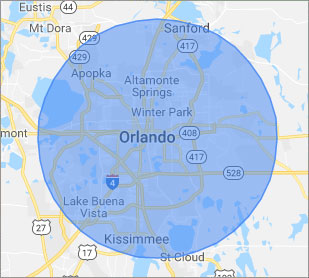
Our primary on-site mobile service areas include the greater Orlando Metropolitan Area and the Phoenix, Tucson, Las Vegas, San Diego, Salt Lake City, Denver, Dallas-Fort Worth and Tampa metro areas.

We provide remote and mobile computer repair in Longwood, Altamonte Springs, Apopka, Azalea Park, Belle Isle, Buena Ventura Lakes, Casselberry, Celebration, DeBary, DeLand, Deltona, Dr. Phillips, Fairview Shores, Geneva, Goldenrod, Hunter's Creek, Kissimmee, Lake Butler, Lake Mary, Lockhart, Maitland, Meadow Woods, Oak Ridge, Ocoee, Orange City, Orlando, Oviedo, Pine Hills, Saint Cloud, Sanford, Southchase, Union Park, Wekiva Springs, Windermere, Winter Garden, Winter Park and Winter Springs.

Our on-site Computer Service Area

What should someone expect that hires you for Computer Service?

Our mission is to fully resolve your computer problems quickly and affordably. If you want a Computer Engineer that can fix all of your computer problems instead of a computer tech, a computer geek, a technician or a computer guy that can only fix some of your problems; call us at (407) 801-6120.  

What types of Computer Services do you perform?

We service businesses and business clients in their homes, including:
 
  • Diagnose / repair hardware or software problems
  • Spyware, malware, trojan and virus removal
  • Setup wireless and small business networks
  • Laptop repair, PC repair and Apple repair
  • Hard drive data recovery

Longwood Computer Repair Service Contact Information

Longwood Computer Repair Service
(407) 801-6120

Longwood Computer Repair Service is a Karls Technology company

* *
*
*
*
  *
* *


*
*
* * * * * * * * * * * * * * *
4.9 / 5 stars from 309 reviews

"Awesome and very fun to talk with!"

Longwood Computer Repair Service 5 / 5 stars

"Jason was the epitome of professionalism. He was so knowledgeable as well as thorough. I would use him anytime. I am extremely happy and thank you very much."

Longwood Computer Repair Service 5 / 5 stars

"My whole experience was great. Ken was personal as well as professional. He was quick and efficient. I would highly recommend."

Longwood Computer Repair Service 5 / 5 stars

"The service was prompt and professional and the price was right! Thank you very much!"

Ahwatukee Computer Repair Service 5 / 5 stars
Best Antivirus Software of 2026: The Ultimate Guide to Cybersecurity Brands

In 2026, the digital threat landscape has shifted. We are no longer just fighting simple viruses; we are defending against AI-generated phishing, sophisticated ransomware-as-a-service, and complex identity theft. Choosing the right antivirus brand is no longer optional—it is the foundation of your digital life. At Karls Technology, we’ve analyzed the top-performing security suites of the […] The post Best Antivirus Software of 2026: The Ultimate Guide to Cybersecurity Brands appeared first on Computer Repair Blog.

Windows OS is Unresponsive – Fast Startup

Turning off this feature could be the quickest and easiest approach to solve this problem. The useful function known as “Fast Startup” maintains your Windows OS in the hibernation mode so that it does not need to be completely relaunched after it has been shut down. This results in a significantly quicker reboot. Even though […] The post Windows OS is Unresponsive – Fast Startup appeared first on Computer Repair Blog.

Force Quit on MacOS

Control-Alt-Delete is the same thing as Option + Command + Esc in macOS. Make use of this keyboard shortcut to bring up the window to force quit applications, which will allow you to view what programs are currently active on your computer. You also have the option of selecting Force Quit from the Apple menu. […] The post Force Quit on MacOS appeared first on Computer Repair Blog.

Windows Text-To-Speech

The Windows text-to-speech functionality is a vital aid for the visually impaired. It’s helpful if you learn best through listening or if you have reading difficulties like dyslexia. This function reads out loud everything you see on the screen, lists the currently running apps and windows, and more. Windows Narrator, a text-to-speech tool, is built […] The post Windows Text-To-Speech appeared first on Computer Repair Blog.

Browser Extensions – Safe or Not?

When little software programs called browser extensions are installed on a web browser, it can be enhanced with new features and functions. Those who work online benefit greatly from these extensions. Similar to how JavaScript may utilize a web page’s APIs (Application Program Interface), a browser extension can do the same.These are also called “plug-ins”. […] The post Browser Extensions – Safe or Not? appeared first on Computer Repair Blog.

Microsoft Fixes Bug on Windows 10

Microsoft has fixed an error that could cause the taskbar and desktop to disappear on Windows 10 computers. The same problem has been attributed by the corporation to the consumers’ gadgets freezing and not responding to input, according to Bleeping Computer. They also share that the affected versions are 20H2, 21H1, 21H2, and 22H2. Make […] The post Microsoft Fixes Bug on Windows 10 appeared first on Computer Repair Blog.

Temporary Files on Windows OS

A temporary file is a file that is made to hold data while another file is being made or updated. The temporary file (also known as a temp file) is deleted after the program has been closed. Temporary files can be used for a wide variety of purposes, from storing and transferring data to handling […] The post Temporary Files on Windows OS appeared first on Computer Repair Blog.

Safari Browser – How to Delete History

When a Mac starts to operate slowly, cleaning the browser’s history is a common first step in getting it back up to speed. Here’s how to do just that: Open Safari For a complete log of your activity, select History from the menu bar. When the submenu appears, select Clear History from its lowest position. […] The post Safari Browser – How to Delete History appeared first on Computer Repair Blog.

If You Don’t Have Newest Windows 11 Update

Your PC may not be compatible with the latest version, or you may not have met the system requirements, thus you haven’t gotten the update notification yet. It’s more probable that you’ll run into issues after upgrading to Windows 11 through Windows Update if you haven’t been warned against doing so. The rollout of the […] The post If You Don’t Have Newest Windows 11 Update appeared first on Computer Repair Blog.

Reset Google Chrome Browser

Is the Google Chrome browser malfunctioning on your computer? Just put it back to factory settings. You can do the task rapidly and effectively. Enter this into the address bar or URL: chrome:/settings/reset You need to choose Advanced from the menu on the left, and then Reset and Cleaning from a little farther down the […] The post Reset Google Chrome Browser appeared first on Computer Repair Blog.